Home / Services / Workflow Automation & AI Agents

Workflow Automation & AI Agents

We design, build and host automations that move data between your apps, read documents with AI, and send the right message at the right time on email, WhatsApp or Slack.

What we build

Connect the apps you already use, such as email, WhatsApp, Google Sheets, Excel, your CRM or accounting software, so routine work runs on its own every day.

Document and invoice processing

Invoices, statements and purchase orders arrive by email; the workflow reads them with AI, checks the totals and writes clean rows into Excel or Google Sheets.

Deadline and payment reminders

Daily checks of filing, renewal or payment due dates, with reminders to clients and staff by email and WhatsApp, and an escalation if nothing happens.

Lead capture and follow-up

Website, marketplace or social media enquiries go straight into your CRM sheet, get an instant reply, and are assigned to the right person.

Scheduled reports

Sales, collections or production numbers pulled from your files every morning and sent as an email or WhatsApp summary to management.

AI agents for email and support

An assistant that sorts incoming email, drafts replies for approval, or answers customer questions from your own documents and price lists.

App-to-app sync

Keep Google Sheets, Excel, your CRM, accounting exports, Slack and Teams in step, so nobody re-types the same data twice.

What changes for your team

The same work, without the manual steps.

Today

  • Staff copy data from emails and PDFs into sheets
  • Reminders depend on someone remembering
  • Leads wait hours for a first reply
  • Reports are compiled and emailed by hand

After we build it

  • Documents read and entered automatically
  • Reminders sent on email and WhatsApp on time
  • Every enquiry logged and answered in minutes
  • Reports delivered to inboxes on a schedule

What you get

  • A working workflow, tested on your real data
  • Error alerts so you know if anything fails
  • Hosting on the cloud or your own server, your choice
  • A short video walkthrough and written notes
  • All workflow files exported and handed to you
  • Three months of free fixes and small changes

Tools and platforms

  • n8n
  • OpenAI
  • Claude
  • Gemini
  • WhatsApp Business API
  • Gmail
  • Outlook
  • Google Sheets
  • Excel
  • Google Drive
  • Slack
  • Telegram
  • Zoho
  • HubSpot
  • Webhooks & APIs

Related work

See all our work

Professional & financial services

Client due-date reminders by email and WhatsApp

A daily workflow that checks every client's deadlines and sends a personal reminder on the right channel, with no one involved.

150+clients reminded each cycle
~20 hrsstaff time saved per month
0duplicate messages
Professional services

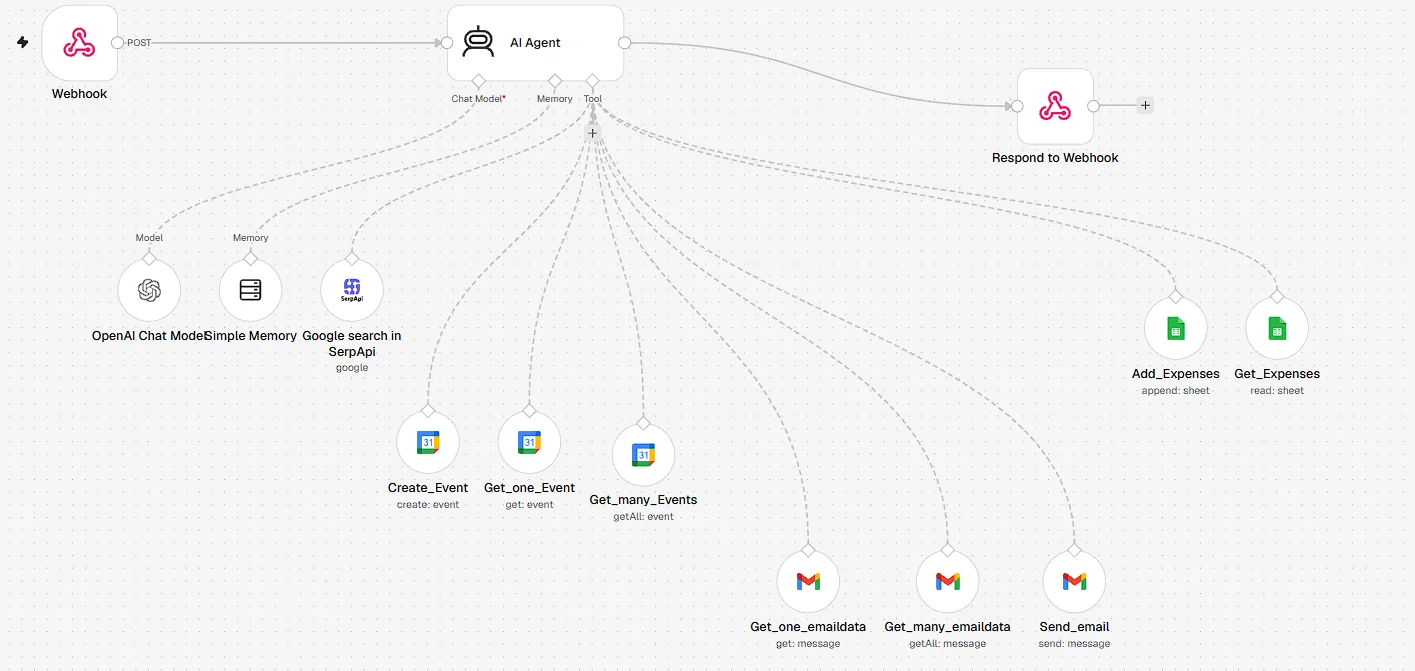
AI personal assistant for a busy business owner

An AI agent the owner messages in plain language to manage meetings, emails and expenses from one chat.

~1 hradmin saved per working day
3 → 1apps replaced by one chat
Instantexpense recording

How we start

  1. Free automation audit

    A 30-minute call to find the tasks worth automating first.

  2. Clear plan and fixed quote

    A written scope and timeline before any work begins.

  3. Build with regular demos

    You see it working on your own data as we build.

  4. Handover and support

    Training for your team, every file handed over, and three months of free support.

Common questions

Which platform do you build automations on?

Mostly n8n, a workflow automation platform that connects hundreds of apps and supports AI steps. Where it suits you better, we also work with Make, Zapier or Power Automate.

Do I have to pay for the automation platform?

Not necessarily. n8n can run on your own server with its free community edition, or on n8n's paid cloud plans if you prefer not to manage a server. We recommend what fits your volume and budget.

Is my data safe?

Workflows run on your own account or server, with your own app connections. We use only the access each step needs and hand over every credential and file at the end.

Can it work with my accounting software or ERP?

Usually yes, through exports, a shared folder, a database connection or the system's API, depending on your setup. We confirm the best route on the first call.

What happens if a workflow stops working?

Every workflow we build sends an alert when a step fails. Fixes are free for three months after handover, and ongoing support is available after that.

Book your free automation audit

Tell us which task your team repeats every week. We reply within one working day with next steps and a time for a 30-minute call.

Best way to reach you

Your details are used only to reply to you. * Required fields.

Mdata Finnovatics

Get a free automation audit

Tell us one task your team repeats every week. We'll show you how it can be automated, reported or simplified.

  • Free 30-minute call
  • No obligation
  • Reply within one working day