Home / Services / Excel Automation & Business Tools

Excel Automation & Business Tools

Macros, forms and Power Query solutions that take the repetitive part out of Excel, built so your team can keep using them long after handover.

What we build

Keep working in Excel, minus the repetitive part. Macros, forms, Power Query cleanups and complete Excel tools that do in seconds what used to take an afternoon.

VBA macros and one-click reports

Clean, merge, format and distribute reports with a single button, across one workbook or hundreds.

Data-entry forms and tools

User forms with validation, drop-downs and calculated fields for billing, inventory, CRM, student or HR records.

PDF to Excel extraction

Bank statements, invoices and reports pulled from PDFs into structured Excel tables, ready for analysis.

Bulk PDFs and emails

Salary slips, invoices, quotations and certificates created as PDFs and emailed to each recipient automatically.

Power Query data cleaning

Repeatable cleanup of messy exports, so next month's file is ready by pressing Refresh.

Excel with AI

Workbooks that call AI models to summarise text, classify entries or extract details from documents and chats.

What changes for your team

The same work, without the manual steps.

Today

  • Hours of copy-paste between workbooks
  • Bank statements and invoices stuck in PDFs
  • Salary slips and quotations made one by one
  • Formulas break when someone edits the sheet

After we build it

  • One click to clean, merge and report
  • PDF data extracted straight into Excel
  • Hundreds of PDFs created and emailed in a run
  • Locked, validated templates with data-entry forms

What you get

  • A tested workbook or add-in that runs on your files
  • Clear buttons and instructions on the sheet itself
  • Protected formulas and validated inputs
  • Clean, commented code you own
  • Fillable PDF forms when a document needs to be filled and shared
  • Three months of free fixes and small changes

Tools and platforms

  • Excel VBA
  • User forms
  • Power Query
  • Power Pivot
  • Excel 365 formulas
  • Outlook
  • Word
  • PDF
  • SQL Server
  • Microsoft Graph
  • AI APIs

Related work

See all our work

Education

Student registration & fee payment system in Excel

A two-tab data-entry form that lets college staff register students, record every instalment and see the balance due instantly.

10 → 2 minto register a new student
0manual balance calculations
Secondsto find any student's history
Corporate & operations management

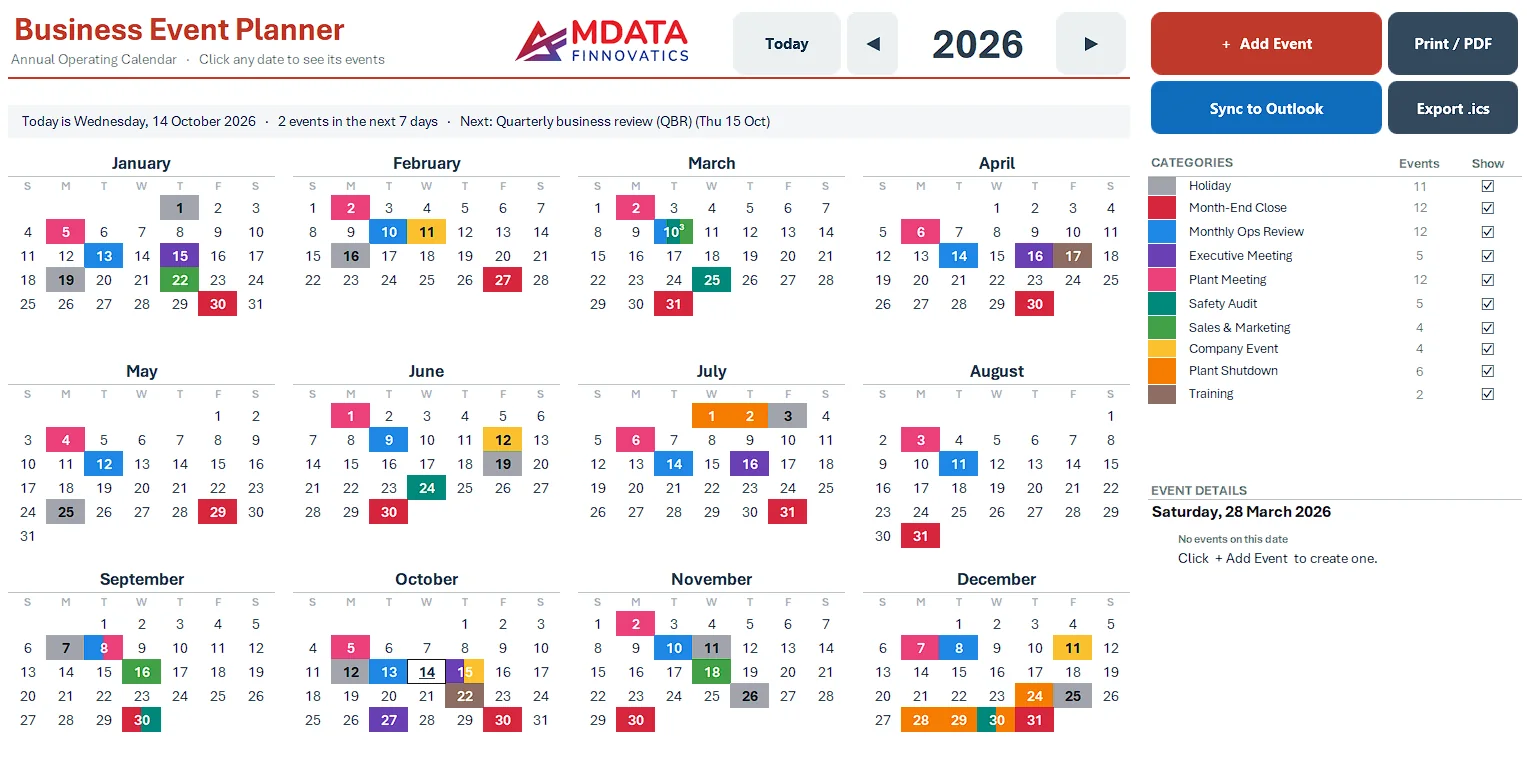
Business Event Planner: the whole year on one Excel screen

An interactive annual calendar that shows every business event for the year at a glance, colour-coded by type, and syncs to Outlook.

12 monthsplanned on one screen
10colour-coded event types
1 clickto Outlook, PDF or .ics

How we start

  1. Free automation audit

    A 30-minute call to find the tasks worth automating first.

  2. Clear plan and fixed quote

    A written scope and timeline before any work begins.

  3. Build with regular demos

    You see it working on your own data as we build.

  4. Handover and support

    Training for your team, every file handed over, and three months of free support.

Common questions

Will the macros work on my version of Excel?

We build for the version your team uses. VBA tools run on Excel for Windows, and many on Mac; if anyone uses Excel online, we tell you upfront what will and will not work.

Should I use VBA, Power Query or Power BI?

Power Query is best for repeatable data cleaning, VBA for actions such as creating files and sending emails, and Power BI when management needs interactive dashboards. We recommend the simplest option that solves the problem.

Can you fix or improve an existing workbook?

Yes. Many projects start with a slow or broken workbook someone built years ago. We review it, fix what is broken and speed it up.

Can you extract data from scanned PDFs?

Text-based PDFs extract cleanly. Scanned PDFs need OCR or AI extraction; we test a sample first and tell you the accuracy to expect.

Do you offer templates?

Yes: ready-made and custom Excel templates for billing, tracking and reporting, set up with your company's fields and rules.

Book your free automation audit

Tell us which task your team repeats every week. We reply within one working day with next steps and a time for a 30-minute call.

Best way to reach you

Your details are used only to reply to you. * Required fields.

Mdata Finnovatics

Get a free automation audit

Tell us one task your team repeats every week. We'll show you how it can be automated, reported or simplified.

  • Free 30-minute call
  • No obligation
  • Reply within one working day